윈도우즈에서 마우스 좌표를 읽어오는 간단한 윈도우즈 앱을 만들어본다.
rust 앱 작성
프로젝트를 library 타입으로 생성한다.
cargo new mousepos --lib // --bin (cargo run)
cd mousepos
// cargo build --release
마우스 좌표를 읽어오는 코드를 구성한다.
`Cargo.toml`
[package]
name = "mousepos"
version = "0.1.0"
edition = "2021"
[lib]
crate-type = ["cdylib"]
[dependencies]
windows = { version = "0.62.2", features = ["Win32_UI_WindowsAndMessaging"] }
`lib.rs`
use windows::Win32::Foundation::POINT;
use windows::Win32::UI::WindowsAndMessaging::GetCursorPos;
#[repr(C)]
pub struct Point {
pub x: i32,
pub y: i32,
}
/// 반환값: 1 = 성공, 0 = 실패
#[no_mangle]
pub extern "C" fn get_cursor_pos(out: *mut Point) -> u8 {
if out.is_null() {
return 0;
}
unsafe {
let mut p = POINT { x: 0, y: 0 };
// windows 0.5x: GetCursorPos -> Result<(), Error>
if GetCursorPos(&mut p as *mut POINT).is_ok() {
(*out).x = p.x;
(*out).y = p.y;
1
} else {
0
}
}
}
Dll file을 빌드한다. 파일을 복사해 둔다.
플러터 앱 작성
dll 파일을 호출한다.
`mouspos_ffi.dart`
import 'dart:ffi';
import 'package:ffi/ffi.dart' as ffi;
base class Point extends Struct {
@Int32()
external int x;
@Int32()
external int y;
}
typedef _GetCursorPosNative = Uint8 Function(Pointer<Point>);
typedef _GetCursorPosDart = int Function(Pointer<Point>);
class MousePos {
final DynamicLibrary _lib;
late final _GetCursorPosDart _getCursorPos;
MousePos._(this._lib) {
_getCursorPos = _lib
.lookupFunction<_GetCursorPosNative, _GetCursorPosDart>('get_cursor_pos');
}
static MousePos load({String? path}) {
// Windows에서는 DLL 파일명만 주어도 PATH 내에서 탐색됨.
final lib = DynamicLibrary.open(path ?? 'mousepos.dll');
return MousePos._(lib);
}
/// (x, y) 반환. 실패 시 null.
({int x, int y})? getCursorPos() {
final out = ffi.calloc<Point>();
try {
final ok = _getCursorPos(out);
if (ok == 1) {
return (x: out.ref.x, y: out.ref.y);
}
return null;
} finally {
ffi.calloc.free(out);
}
}
}
ui 파트를 작성한다.
`main.dart`
import 'dart:async';
import 'package:flutter/material.dart';
import 'mousepos_ffi.dart';
void main() {
runApp(const MyApp());
}
class MyApp extends StatelessWidget {
const MyApp({super.key});
@override
Widget build(BuildContext context) {
return const MaterialApp(
debugShowCheckedModeBanner: false,
home: MousePosPage(),
);
}
}
class MousePosPage extends StatefulWidget {
const MousePosPage({super.key});
@override
State<MousePosPage> createState() => _MousePosPageState();
}
class _MousePosPageState extends State<MousePosPage> {
late final MousePos _mousePos;
Timer? _timer;
String _text = '좌표를 읽는 중...';
@override
void initState() {
super.initState();
_mousePos = MousePos.load(); // mousepos.dll을 동일 폴더에 둡니다.
_timer = Timer.periodic(const Duration(milliseconds: 33), (_) {
final p = _mousePos.getCursorPos();
if (!mounted) return;
setState(() {
_text = p == null ? '읽기 실패' : 'X: ${p.x} , Y: ${p.y}';
});
});
}
@override
void dispose() {
_timer?.cancel();
super.dispose();
}
@override
Widget build(BuildContext context) {
return Scaffold(
appBar: AppBar(
title: const Text('마우스 좌표 표시 (Rust + Flutter)'),
backgroundColor: Colors.grey,
),
body: Center(child: Text(_text, style: const TextStyle(fontSize: 28))),
);
}
}
저장해두었던 dll 파일을
build > windows > x64 > runner > debug 또는 build > windows > x64 > runner > release 폴더에 옮긴다.
dll 파일이 없으면 exe 파일 실행시 파일이 없다고 나온다.
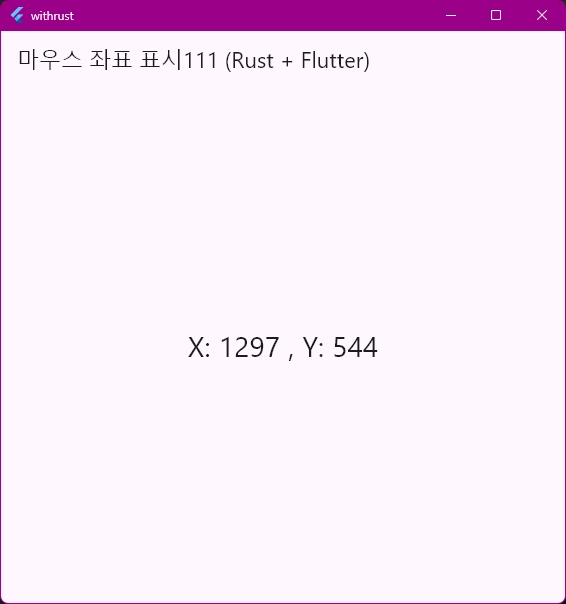
결과물
C++로 하다보면 visual studio를 켜는 것만으로도 상당히 부담스러운데, 마침 잘 되니, 가볍게 사용하기엔 더 좋은 듯하다. 어디까지 가능할지 생각을 해봐야겠다.
끝.
728x90